
Surface Labs Speed Test
Two graphs, two apps, one laptop GPU: Surface Labs 1.2 vs Substance 3D Designer 13.1.2, node by node, including the bracket where Substance wins.
Surface Labs, as of ver 1.2.0, ships with a Rust Engine to compute and render all shader nodes and the 3D viewport. I’ve known for a while that it’s fast - but a side by side comparison has been on my todo list since the engine - not Dart - rendered its first 2D node. I have to say, I’m quite pleased with the results and overall they’ve shown me some places that the app can still find improvements.
The setup
All tests ran on my personal laptop and were recorded via OBS at 1080p 60fps. To make them more optimal for the website, they were converted to .webm formats at a lower FPS.
- Hardware: i7-11800H · laptop RTX 3070 · 64 GB DDR4 · Windows 11
- Substance 3D Designer 13.1.2 (2023, Steam edition), Direct3D 11 engine
- Surface Labs 1.2, Direct3D 12 (native Rust engine)
- Matched per stage: same resolutions, same 16-bit depth, same node parameters on both sides (one exception, noted in the fine print)
- Timings are each app’s own per-node profiler readout, warm (first-run shader compiles excluded; covered in Cold starts)
Being up front - the screenshots are unfair to both applications.
It’s easy to sit down and photoshop some images together and be like “Look how amazing I am!” Some applications show cold start times and others just happen to have an unlucky render. This is why videos were made to show multiple random generations using as accurate graphs as possible between the two.
Substance Designer 2023 (ver 13.1.2)
The whole reason I programmed this application is because of the absurdity of subscriptions and rising costs of tools by the monoliths in the game development community. 13.1.2 just happens to be the version I have a license to via steam, and I have no intent on purchasing a new license just to compare. I would love to see other users compare and contrast the software with their own findings, and I’d be happy to append or create a new blog post with community findings (community reviewed as well) with latest versions.
Test 1: the blur stack
Three parallel chains of Noise → Blur → Slope Blur at 1024², 2048², and 4096², all 16-bit, with a Clouds node driving each Slope Blur’s effect input. Both Slope Blur nodes ran in their default state as created: 8 samples at intensity 10 in Designer, 32 samples at intensity 0.10 in Surface Labs. The two implementations are not 1:1 internally, so read that row as default vs default, not as a like-for-like kernel comparison.
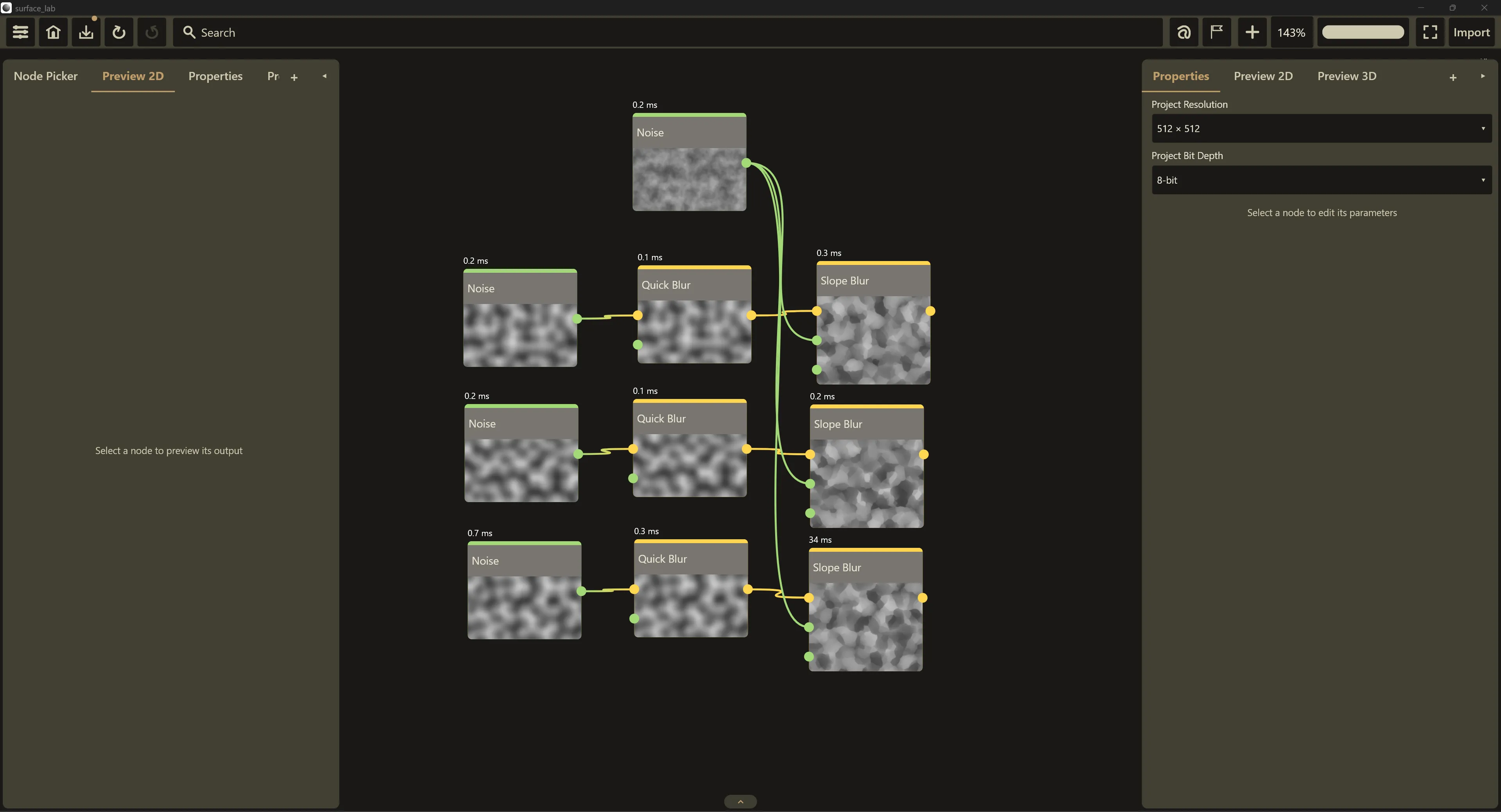
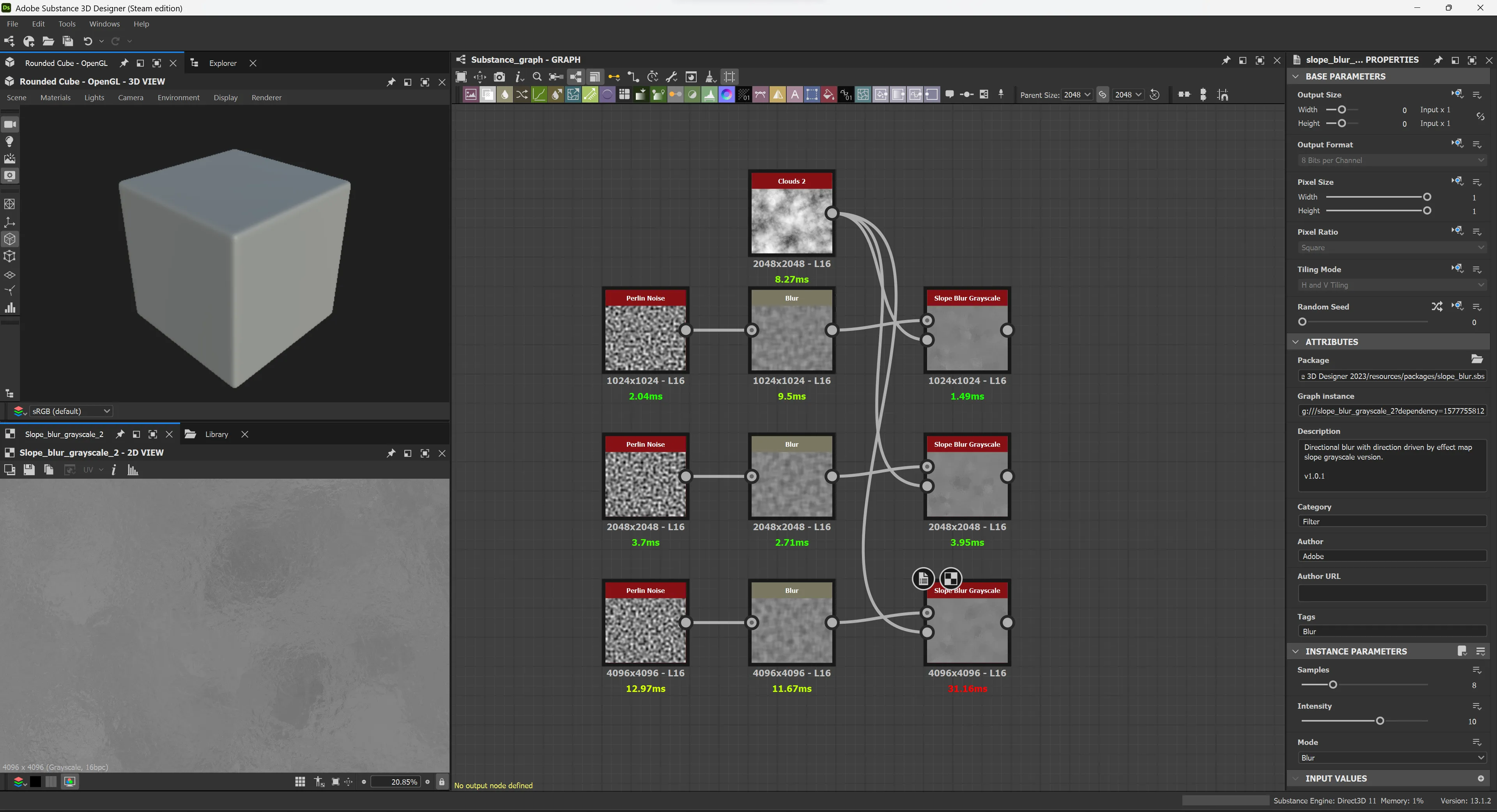
All numbers in milliseconds, lower is better. Ranges span the seed rolls in the videos plus the still captures.
| Node | Resolution | Substance 13.1.2 | Surface Labs 1.2 | Typical |
|---|---|---|---|---|
| Noise (Perlin) | 1024² | 1.46 to 2.71 | 0.2 to 0.3 | ~8× faster |
| Blur | 1024² | 0.33 to 1.87* | 0.1 | ~11× faster |
| Slope Blur | 1024² | 1.04 to 1.49 | 0.3 to 0.4 | ~3× faster |
| Noise (Perlin) | 2048² | 3.70 to 4.42 | 0.2 | ~20× faster |
| Blur | 2048² | 1.01 to 2.71 | 0.1 | ~20× faster |
| Slope Blur | 2048² | 2.07 to 3.95 | 0.2 to 0.3 | ~10× faster |
| Noise (Perlin) | 4096² | 12.97 to 25.96 | 0.3 to 0.7 | ~40× faster |
| Blur | 4096² | 4.89 to 11.67 | 0.2 to 0.3 | ~22× faster |
| Slope Blur | 4096² | 21.58 to 31.16 | 34.0 | Substance wins by ~10 to 35% |
* One 9.50 ms sample of Designer’s 1024² Blur was excluded as a first-run shader compile, not steady state.
In these samples, I think the results speak for themselves. I’m no stranger to archaic code, project maintenance, and the other onslaught of issues being a legacy software brings. Across the board it’s apparent that Surface Labs performs better at nearly every stage.
I’m not privy to the codebase of Substance, but I have my suspicions that they maintain an aggressive stance on caching and recalculating shaders depending on various criteria. The Rust Engine is fast, and DX12 is a modern graphics API compared to DX11 and whatever else Substance has going on under the hood.
I’m also considering an optional Vulkan/DX12 choice for Windows users in a future update.
I actually really enjoy that I took a loss on the slope blur. Compute shaders - which we’ll discuss more in the next section is still fairly new to me as a programmer. My slope blur is a compute shader, and actually drives the same backend as my erosion node as well. At 4k resolution taking a loss is actually a win, and I’m looking forward to reviewing this shader and bringing a stronger engine to the field in future updates.
Test 2: the Tile Sampler
Four shape generators feeding a 16×16 Tile Sampler, into a normal map, into the material output. Everything at 2048², 16-bit, on both sides.
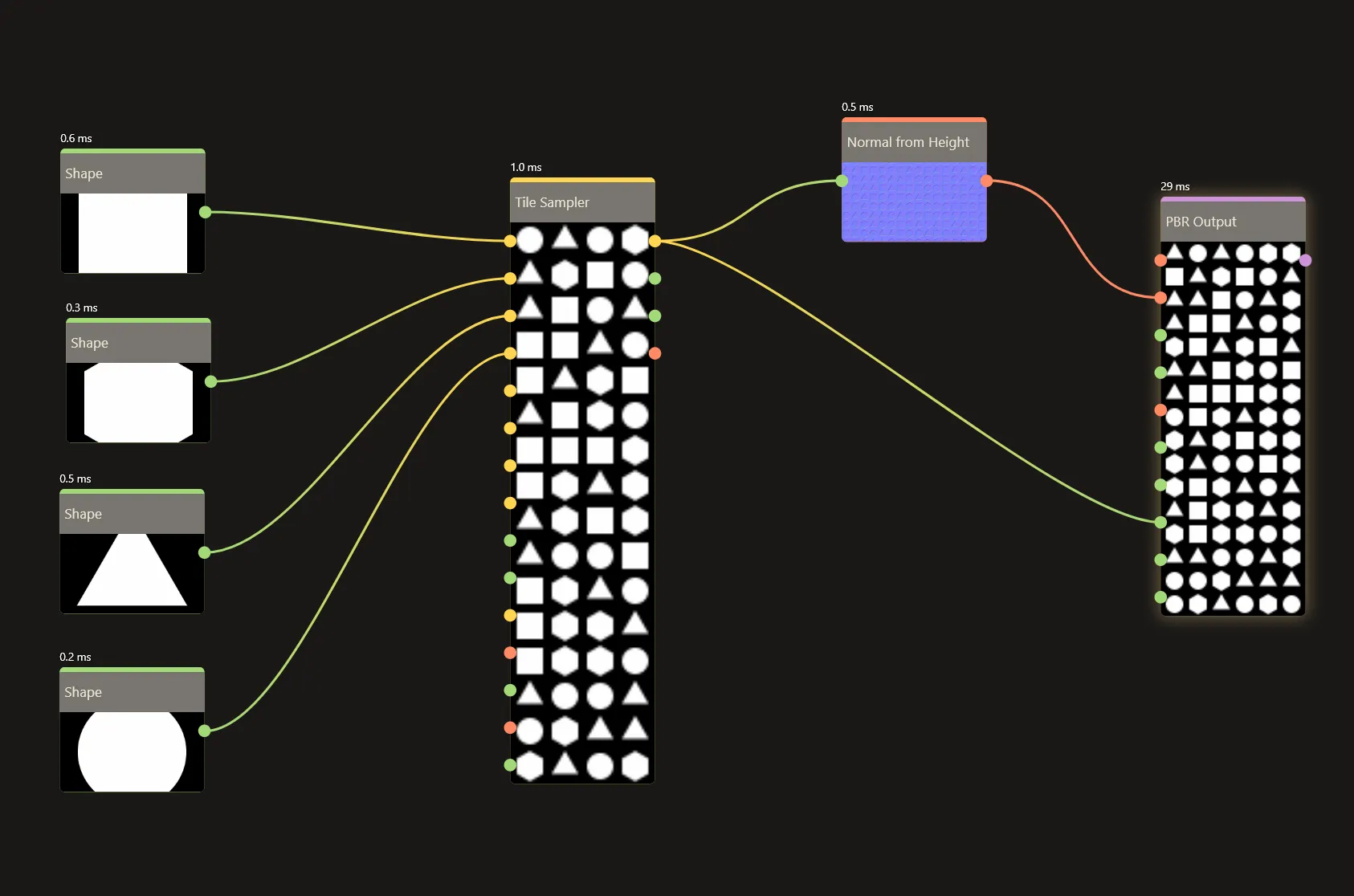
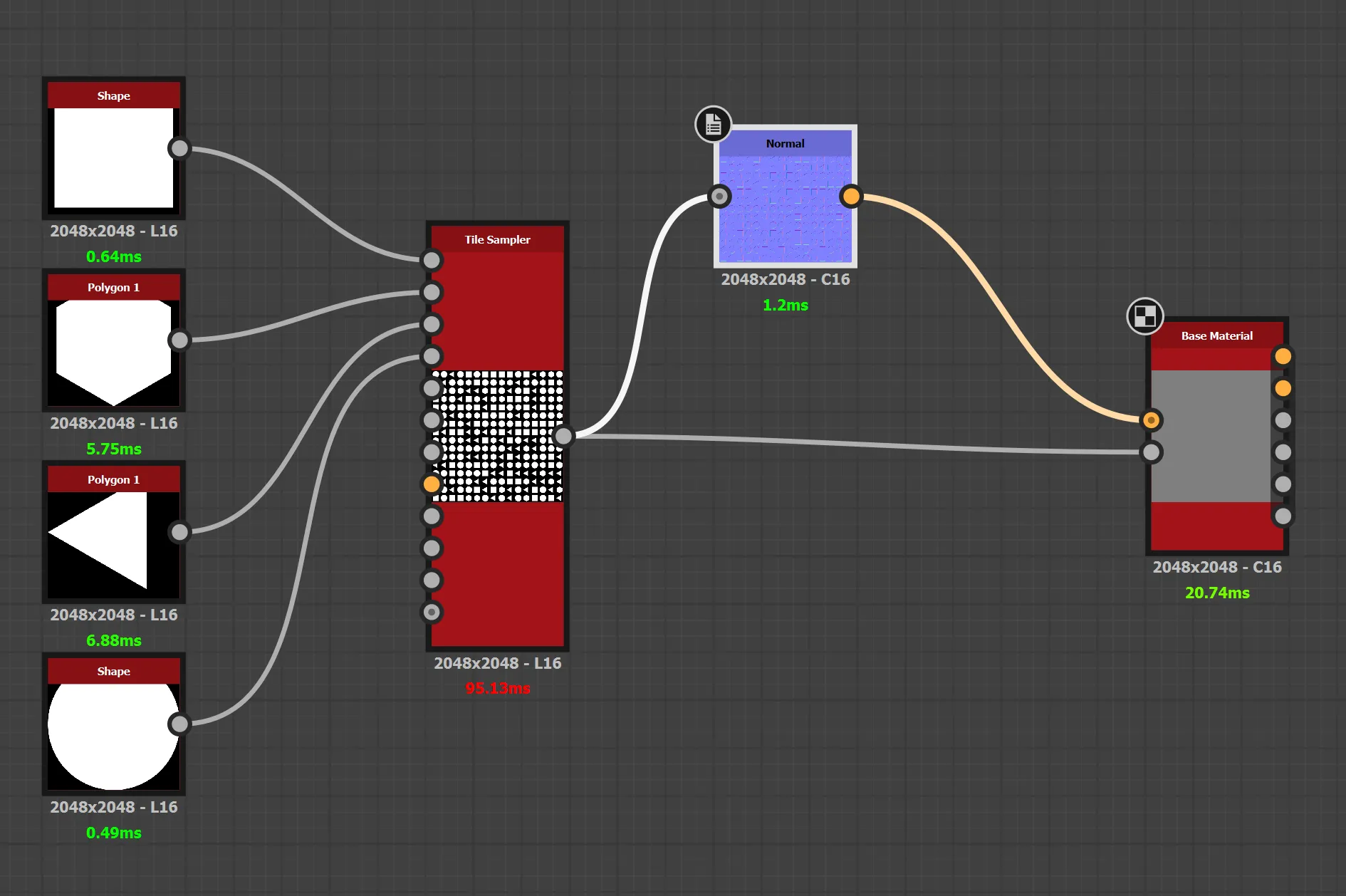
| Node | Substance 13.1.2 | Surface Labs 1.2 | Typical |
|---|---|---|---|
| Shape (square) | 0.64 | 0.6 | ~1× (tie) |
| Polygon (pentagon) | 5.75 | 0.3 | ~19× faster |
| Polygon (triangle) | 2.46 to 6.88 | 0.5 | ~9 to 14× faster |
| Shape (circle) | 0.49 to 3.34 | 0.2 to 0.8 | ~2 to 4× faster |
| Tile Sampler (16×16) | 65.87 to 95.13 | 1.0 | ~66 to 95× faster |
| Normal | 0.18 to 1.2 | 0.1 to 0.5 | ~2× faster |
| Output node | 20.74 to 27.94 | 29 | Substance slightly faster |
† The output nodes are different nodes doing different work, Designer’s Base Material vs Surface Labs’ PBR Output, included for completeness rather than comparison - and the PBR Output node still needs a second pass since the 2D side of the rust engine has been implemented.
Ooooookayyy… so lets not get ahead of ourselves here. 66-95x faster is a CRAZY thing to claim. Well I am. beat it. Actually not impossible, it’s just a different generation and technical spec for the two systems. All Substance Designer nodes can be “opened” and viewed freely, and so we know that Substance relies heavily on the FXMap - or a sequential algorithm for splattering. They’re also computing several more layers of data than I am and so in theory their node is more robust.
Surface Labs differs because it’s built on compute shaders. It resolves each pixel in parallel at once, then maps the basic amount of data available to use elsewhere in the graph. It’s not a marvel of engineering, it’s simply newer and built on modern tech.
Cold starts
Both apps pay a first-evaluation cost, and it’s only fair to show both:
- Surface Labs’ Tile Sampler opened at 161 ms on its first evaluation and settled to 1.0 ms every roll after. The PBR Output went 65 → 29 ms.
- Designer’s 1024² Blur first ran at 9.50 ms before settling to well under 2 ms. Its Tile Sampler, however, never dropped below ~66 ms warm.
The fine print
- This is not an exhaustive benchmark: two graphs, a handful of nodes, one machine.
- Designer 13.1.2 is the newest version I own. Newer releases may well be faster - if you run these graphs on 14.x+, I’d like to see the numbers.
- All timings come from each app’s built-in per-node profiler, read off the node UI, warm, across repeated seed randomization. The videos are the raw evidence being used here, with pngs for slower internet connections.
- Node parameters were matched wherever the two apps expose the same control (resolutions, bit depth, 16×16 sampling). The Slope Blurs are the one exception: each ran at its own defaults (8 samples / intensity 10 in Designer, 32 samples / intensity 0.10 in Surface Labs) and the two implementations are not 1:1 internally. The outputs are shown so you can judge equivalence yourself.
Conclusion
Needless to say, I really find my work in Surface Labs to be worthwhile. These timings - as scuffed as my testing may be - prove that I’m onto something that’s a contender. Infantile but promising. Also - who else has texturing on iPads? Just sayin. Thanks for reading my silly blog post, and look forward to version 1.2.1 where I render the world faster than 3ms.
just kidding, but I did redo the toolbar and I’ve also started making real documentation.